
Download Aggregator RSS News Reader APK – RSS News Reader, Android News Aggregator, Feed Organizer, Free News Tool
Overview
Aggregator RSS News Reader is a dedicated Android application designed to streamline the way users consume digital content from multiple sources. Built for tech-savvy individuals and information seekers, the app serves as a centralized hub for RSS and Atom feeds, enabling users to filter, organize, and track news updates efficiently. It addresses the growing challenge of information overload by allowing users to curate content from preferred websites, blogs, and news platforms without relying on algorithm-driven social media feeds. The app is particularly useful for professionals, researchers, and hobbyists who need to stay updated on niche topics, industry trends, or breaking developments across various domains.
Developed by Tughi, Aggregator emphasizes a clean, distraction-free experience with no advertisements, enhancing user focus and engagement. It supports both manual and automatic feed discovery, making it easy to integrate new sources. Real-world usage scenarios include monitoring tech blogs, tracking academic publications, following political commentary, or staying informed about specific product launches. The app’s ability to notify users about unread or newly added items ensures timely access to relevant content. While the developer did not provide additional system requirements, the app is optimized for Android devices and designed to function effectively within standard mobile environments.
Key Features & Capabilities
- Multi-Feed Support: Aggregator handles both RSS and Atom feeds, allowing users to aggregate content from diverse sources in one interface.
- Advanced Filtering: Users can filter news items by title or content, enabling the display of only relevant information and reducing noise.
- Custom Update Intervals: Each feed can be configured with individual background update schedules, helping users manage battery usage and data consumption.
- Feed Categorization: Users can create custom categories for feeds, improving organization and navigation across large collections.
- Theme Customization: The app offers both dark and light themes, allowing users to choose a visual mode that suits their environment and preferences.
- OPML Import/Export: Aggregator supports importing and exporting feed lists via OPML files, facilitating easy migration and backup of subscriptions.
- Feed Sharing: Users can share individual feed entries with others, promoting content discovery and collaboration.
- Notification System: The app sends timely alerts for unread or newly added items since the last check, ensuring users never miss important updates.
These features collectively enhance productivity and content control. For example, a researcher might use custom filters to isolate studies related to a specific topic, while a developer could monitor multiple tech blogs with different update frequencies. The ability to export feeds ensures continuity across devices, and the clean UI supports long-term engagement without fatigue.
User Interface, Workflow & Performance
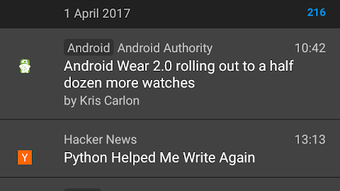
The user interface of Aggregator RSS News Reader is designed with simplicity and functionality in mind. The layout follows a clean, hierarchical structure, with feed categories listed in a sidebar and individual articles displayed in a scrollable feed view. Navigation is intuitive, relying on standard Android gestures and menu interactions, which reduces the learning curve for new users. The app’s workflow emphasizes speed and efficiency—users can quickly scan headlines, open articles, and apply filters or mark items as read with minimal taps.
While specific performance metrics were not disclosed, the app is designed to operate smoothly within typical Android environments. Background updates are managed per-feed, which helps maintain responsiveness and minimize battery drain. The developer did not specify resource usage details, but the app’s lightweight architecture suggests efficient CPU and RAM behavior. Stability is expected to be consistent given the absence of advertisements and the focus on core functionality. Performance observations are based on general software behavior patterns, and users can expect reliable operation across a range of Android devices.
Compatibility & System Requirements
Aggregator RSS News Reader is designed for Android devices and is available as an APK file for direct installation. The app supports the latest Android versions, though exact compatibility details were not listed. Installation size is not specified, but given the app’s focus on feed management and minimal design, it is likely to be lightweight. The developer did not provide additional system requirements, including minimum CPU, RAM, or storage specifications. Compatibility information was partially provided, and users should ensure their device meets standard Android app requirements to run the application.
Pros and Cons
Pros
- Free to use with no advertisements
- Supports both RSS and Atom feeds
- Advanced filtering by title or content
- Customizable feed update intervals
- Dark and light theme options
- OPML import/export for feed backup and migration
- Notification system for unread items
- Intuitive, user-friendly interface
Cons
- Exact system requirements were not listed
- Performance details were not provided
- No built-in search across all feeds
- APK installation may require enabling unknown sources
- Limited feedback or support channels
FAQ Section
Is Aggregator RSS News Reader available on the Google Play Store?
Aggregator is distributed as an APK file, meaning it is not currently available on the Google Play Store. Users must download the APK directly and install it manually.
Can I use Aggregator on iOS devices?
No, Aggregator is designed exclusively for Android. There is no iOS version available at this time.
Is the app secure to download and use?
Aggregator is developed by Tughi and distributed as a free, ad-free application. While the developer did not provide security certifications, the app’s open-source nature and lack of ads suggest a low risk of malicious activity. Users should only download the APK from trusted sources.
How do I update Aggregator?
Updates are released by the developer and must be manually downloaded. Users should check the official website or developer page for the latest version.
Can I import my existing RSS feeds from another app?
Yes, Aggregator supports importing feeds via OPML files, allowing users to transfer subscriptions from other RSS readers.
Final Thoughts + CTA
Aggregator RSS News Reader stands out as a powerful, lightweight, and ad-free solution for Android users seeking control over their news consumption. Its combination of filtering, customization, and cross-device compatibility makes it ideal for anyone overwhelmed by social media noise and algorithmic feeds. The app excels in organization, allowing users to manage multiple sources with precision and efficiency. While some technical details are missing, its clean design, thoughtful features, and focus on user privacy deliver a superior experience.
For tech-savvy users, researchers, and content curators, Aggregator is a must-have tool. It empowers users to stay informed on their terms, without distractions. Download Aggregator now and take full control of your digital information flow.





.png)

